
A working spreadsheet that looks and works like Excel: 24 hands-on tasks, scored automatically.
Delivered on iTestHub. SheetCheck runs on iTestHub, Viewpoint’s sister testing platform. Contact us and we’ll set it up for you, or use it directly on iTestHub: see SheetCheck on iTestHub.
Call or email to discuss our tests or book a demo: +44 (0)7872 019525 or support@viewpoint-psychology.com
What Does SheetCheck Assess?
SheetCheck tests Excel skills the way they're actually used. Candidates work in a spreadsheet that looks and works like Microsoft Excel, with the same ribbon, menus and keyboard shortcuts, and complete 24 hands-on tasks. There's no multiple choice and no marking: every task is checked automatically.
- - Working fluency: Entering and formatting data, sorting, navigation and simple formulas.
- - Functions and analysis: SUMIF, COUNTIF, IF logic, filters and conditional formatting.
- - Modelling and lookups (Advanced): XLOOKUP, INDEX/MATCH, pivot tables, charts and absolute references.
Who Should Take This Test?
SheetCheck suits any role that uses Excel, from everyday office work to analysis:
- - Administrators and office staff
- - Finance and accounts roles
- - Analysts
- - Operations roles
SheetCheck Format
- - Core: 24 tasks in 35 minutes, covering the basic and intermediate skills every office role needs
- - Advanced: 30 minutes, adding pivot tables, lookups and modelling
- - Tasks are done in a working spreadsheet that looks like Excel
- - Scored automatically; candidates can skip a task and come back to it
Example SheetCheck Question
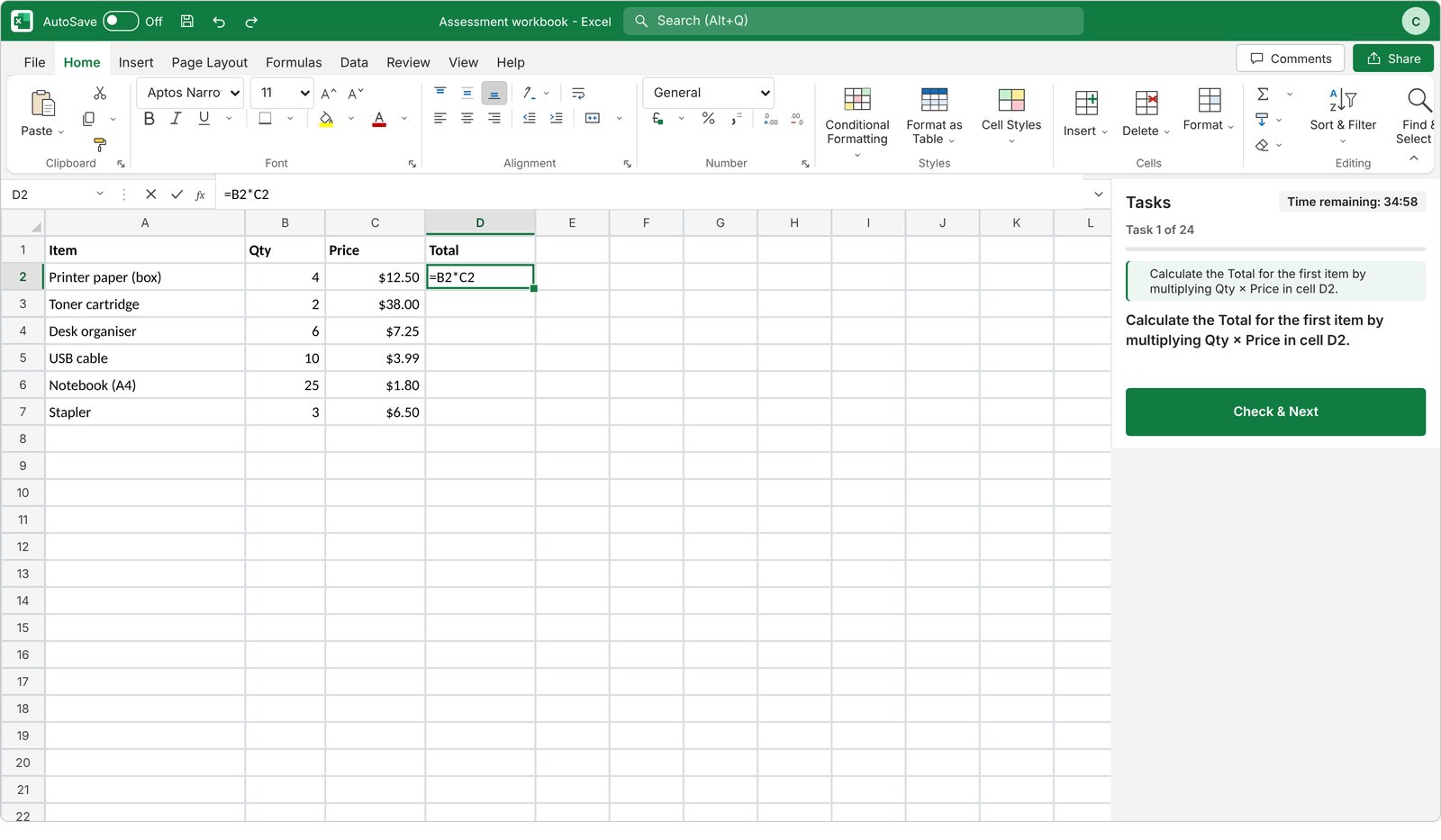
The SheetCheck test screen, as candidates see it.
Practice task: Calculate the Total for the first item by multiplying Qty × Price in cell D2.
Candidates do each task in a working spreadsheet that looks like Excel, using the ribbon, menus or keyboard shortcuts as they would at work.
Practice SheetCheck
Try the practice tasks in the same SheetCheck interface candidates use. Click below to start.
SheetCheck Report
The report shows the candidate's score and score band (Very Low to Very High) by skill area. It comes in two versions: an Assessor Report with interview questions, and a Candidate Report with no scores and practical development advice.
How to Do Well in SheetCheck
- Try the practice tasks: They use the same spreadsheet as the real test, so you can get used to it first.
- Use what you know: Ribbon buttons, right-click menus and keyboard shortcuts all work as in Excel.
- Read the task carefully: Check the exact cells or range the task names.
- Skip and come back: If a task is taking too long, skip it and return at the end.
More Free Tests
Try additional psychometric tests for free:
Take a Free SJT Take a Free Personality Test Take a Free Critical Reasoning Test Take a Free Barista SJT