
Real Python against a real dataset in an in-browser editor: 24 hands-on tasks, scored automatically.
Delivered on iTestHub. PyCheck runs on iTestHub, Viewpoint’s sister testing platform. Contact us and we’ll set it up for you, or use it directly on iTestHub: see PyCheck on iTestHub.
Call or email to discuss our tests or book a demo: +44 (0)7872 019525 or support@viewpoint-psychology.com
What Does PyCheck Assess?
PyCheck tests Python skills in code, not multiple choice. Candidates write and run real Python against a real dataset in a sandboxed, in-browser editor, completing 24 hands-on tasks that are checked automatically.
- - Fundamentals: Variables, types, f-strings, loops, conditionals, simple functions and reading CSV data.
- - Data handling: Comprehensions, sorting with keys, aggregating into dictionaries, dates, exceptions and reading files.
- - Design and robustness (Advanced): Classes, generators, regular expressions, joining datasets, robust parsing and writing tests.
Who Should Take This Test?
PyCheck suits roles that write Python to work with data:
- - Data analysts
- - Junior developers
- - Graduates in technical roles
- - Automation and reporting roles
PyCheck Format
- - Core: 24 tasks in 35 minutes, covering fundamentals and everyday data handling
- - Advanced: 30 minutes, adding classes, generators, robust parsing and tests
- - Code is written and run in a sandboxed in-browser editor
- - Scored automatically; no AI assistance
Example PyCheck Question
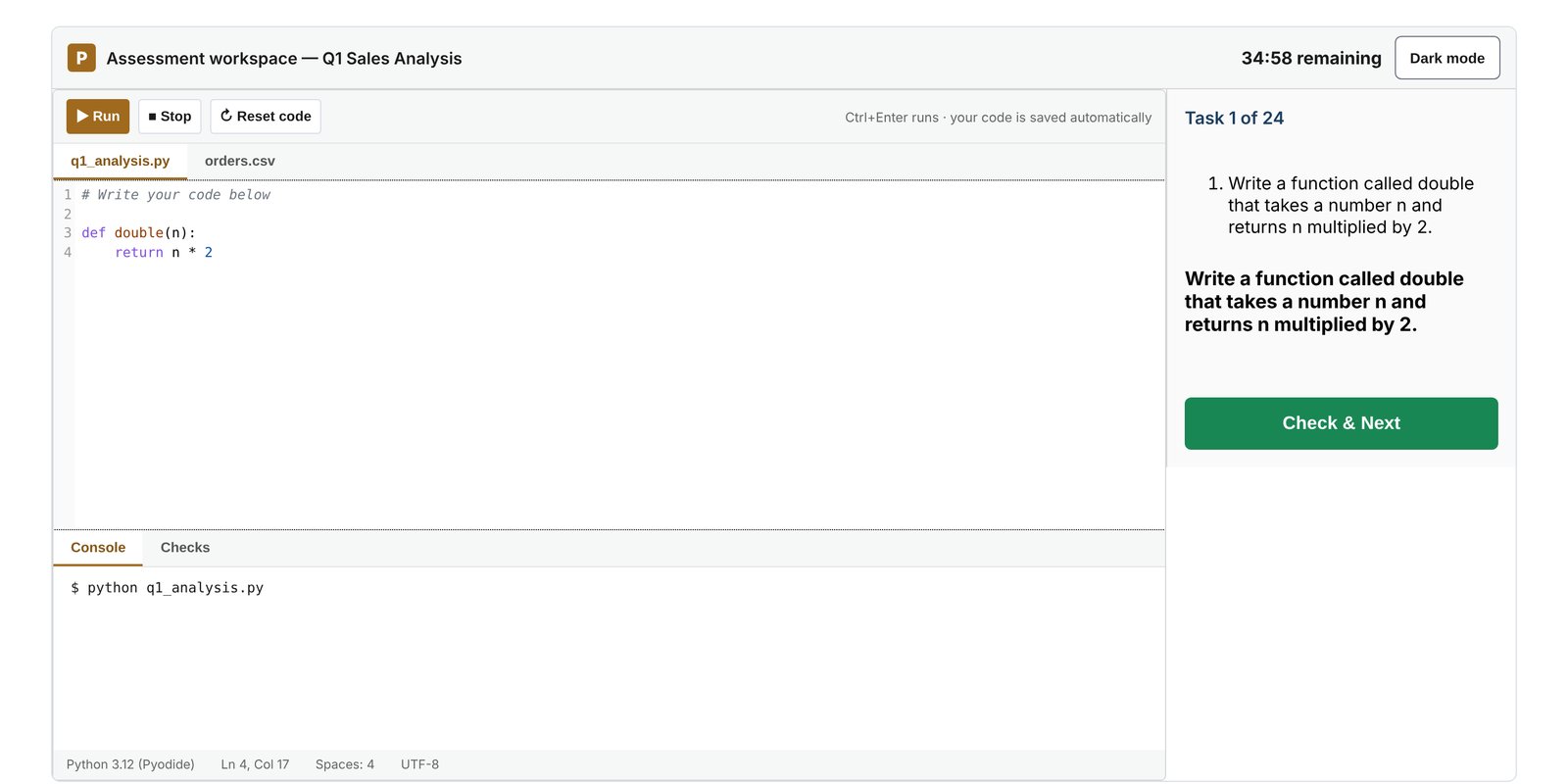
The PyCheck test screen, as candidates see it.
Practice task: Write a function called double that takes a number n and returns n multiplied by 2.
Candidates write and run their code in the editor, then submit when it works.
Practice PyCheck
Try the practice tasks in the same PyCheck interface candidates use. Click below to start.
PyCheck Report
The report shows the candidate's score and score band (Very Low to Very High) by skill area. It comes in two versions: an Assessor Report with interview questions, and a Candidate Report with no scores and practical development advice.
How to Do Well in PyCheck
- Try the practice tasks: Get used to the editor before the test starts.
- Run your code often: Test small pieces as you go rather than all at the end.
- Read the expected output: Match the exact type and format the task asks for.
- Skip and come back: If a task is taking too long, skip it and return at the end.
More Free Tests
Try additional psychometric tests for free:
Take a Free SJT Take a Free Personality Test Take a Free Critical Reasoning Test Take a Free Barista SJT