
Realistic AI-assisted work scenarios: prompting, checking AI output, judgement and workflow, scored automatically.
Delivered on iTestHub. AICheck runs on iTestHub, Viewpoint’s sister testing platform. Contact us and we’ll set it up for you, or use it directly on iTestHub: see AICheck on iTestHub.
Call or email to discuss our tests or book a demo: +44 (0)7872 019525 or support@viewpoint-psychology.com
What Does AICheck Assess?
AICheck tests how well people actually use AI at work. Candidates work through realistic AI-assisted scenarios: writing prompts, ordering workflows, fact-checking AI output against real data and making judgement calls. The in-test Assistant is scripted, so every candidate sees the identical conversation and results are directly comparable. The test is built on the UK AI Skills for Business Competency Framework (Alan Turing Institute / DSIT).
- - Prompting: Choosing, improving and writing prompts that state the task, audience, source material and format.
- - Verification: Fact-checking AI-drafted work against the source data and catching invented or out-of-date figures.
- - Judgement: Knowing when to use AI and when not to, and what never to paste into an external tool.
- - Workflow: Doing an AI-assisted job in the right order: gather, give context, draft, verify, edit, then send.
Who Should Take This Test?
AICheck suits any role where people use AI tools in their work:
- - Office and administrative roles
- - Analysts and researchers
- - Managers
- - Graduates
AICheck Format
- - Core: 35 minutes, covering everyday AI use such as drafting, email and summarising
- - Advanced: 30 minutes, adding data analysis, research due diligence and sensitive-data judgement
- - A scripted in-test Assistant, so every candidate sees the same responses
- - Scored automatically
Example AICheck Question
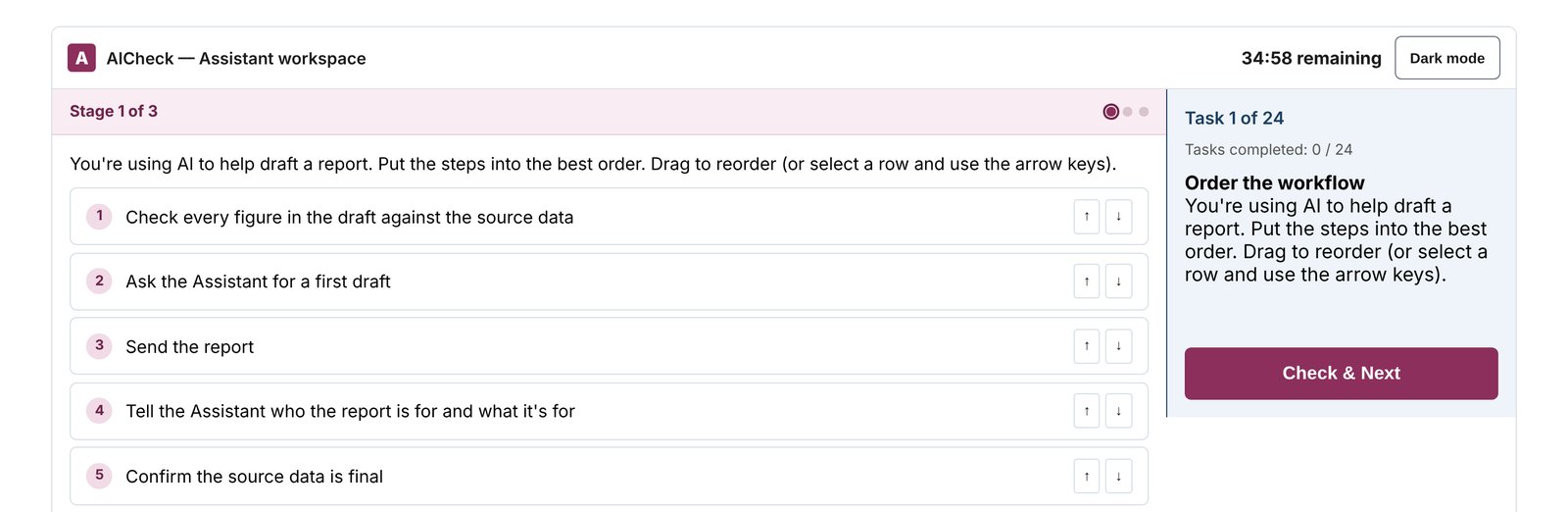
The AICheck test screen, as candidates see it.
Example task: You’re using AI to help draft a report. Put the steps into the best order.
Candidates drag the steps into order, choose between prompts, and check AI-drafted work against the source data.
Practice AICheck
Try the practice tasks in the same AICheck interface candidates use. Click below to start.
AICheck Report
The report shows the candidate's score and score band (Very Low to Very High) for each of the four skill areas. It comes in two versions: an Assessor Report with interview questions, and a Candidate Report with no scores and practical development advice.
How to Do Well in AICheck
- Check every figure: Treat AI output as a first draft and compare it with the source.
- Be specific in prompts: Say what you want, who it's for, what to use and how it should look.
- Protect sensitive data: Never paste personal or confidential information into an external tool.
- Keep decisions with people: Use AI to help, not to make the final call.
More Free Tests
Try additional psychometric tests for free:
Take a Free SJT Take a Free Personality Test Take a Free Critical Reasoning Test Take a Free Barista SJT